
项目界面展示
登录界面
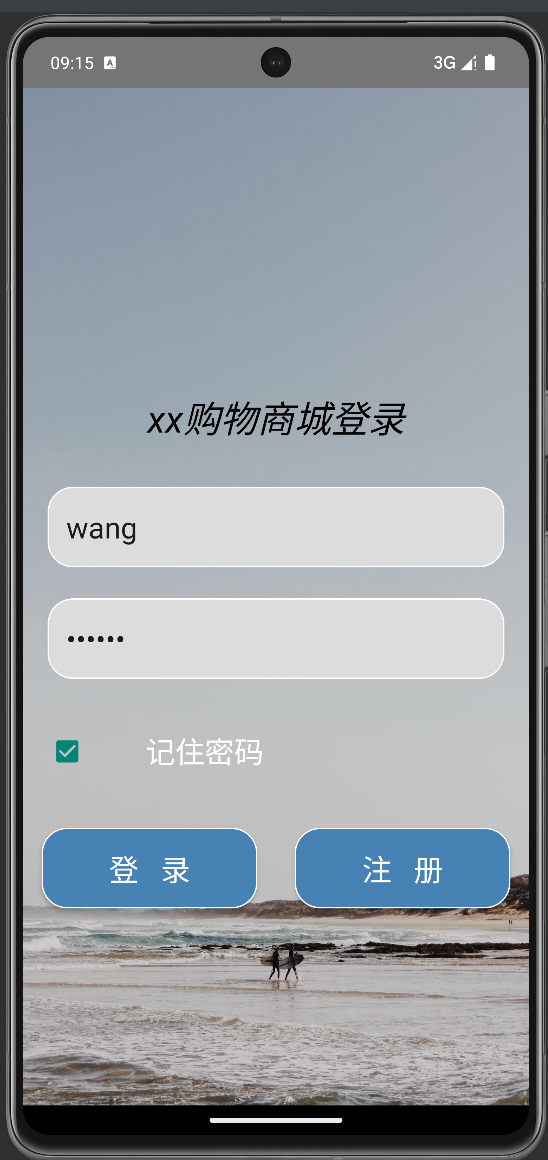
注册界面
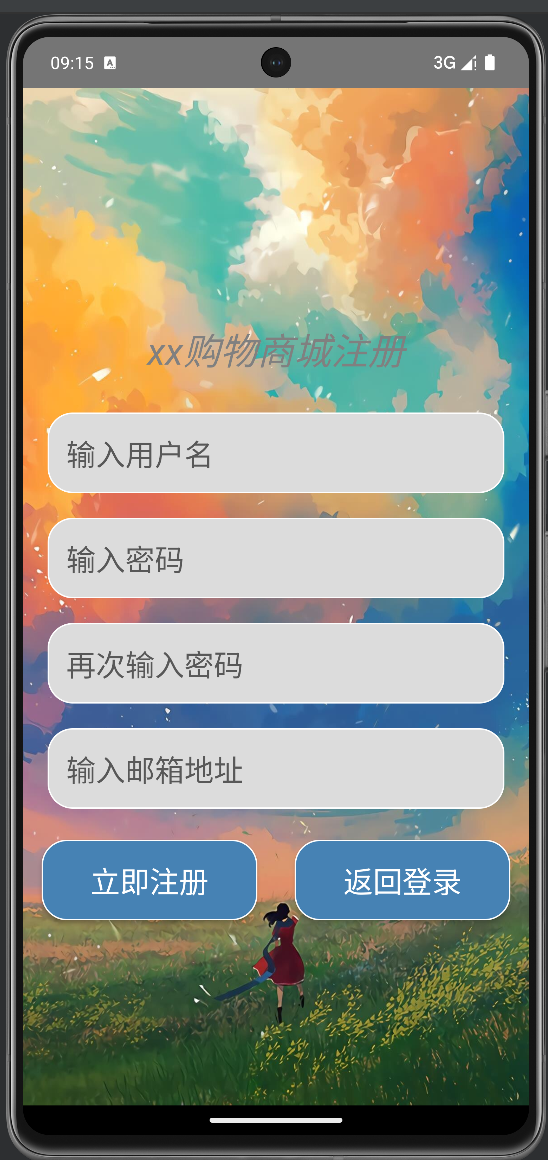
商品列表界面
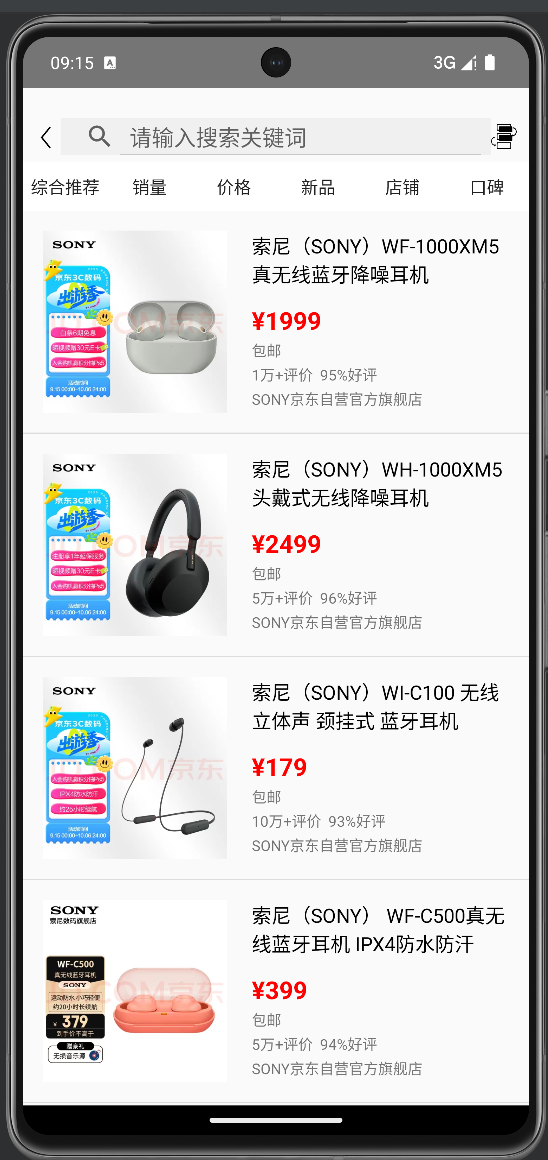
商品详情页
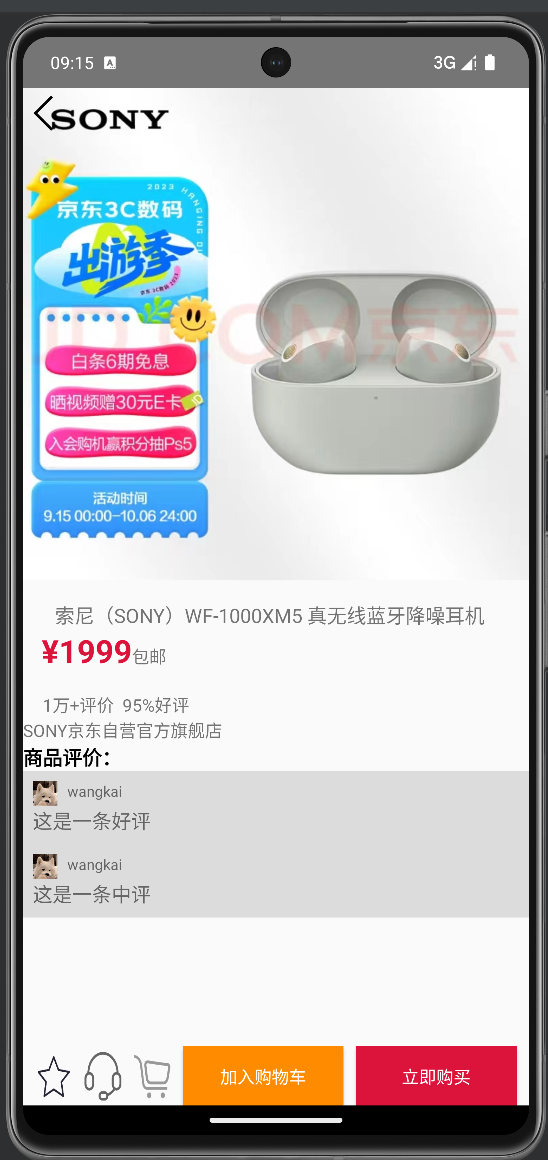
购买确定界面
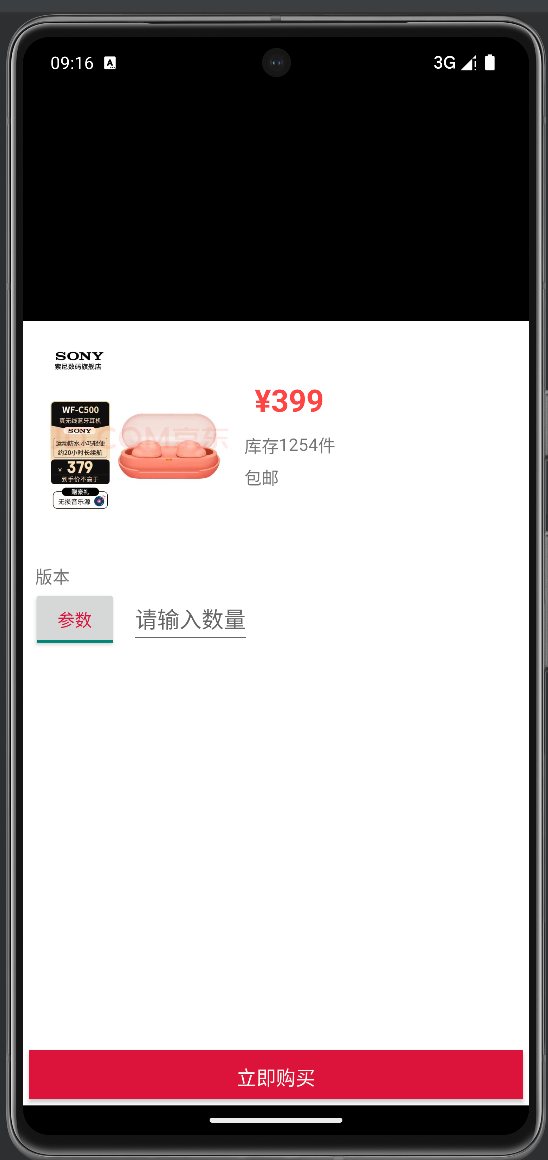
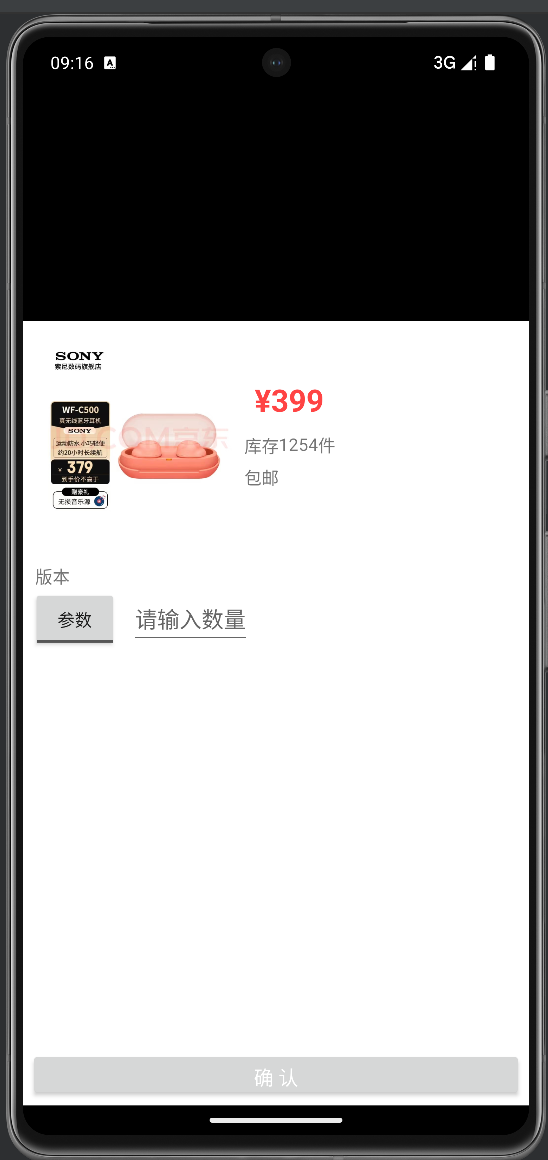
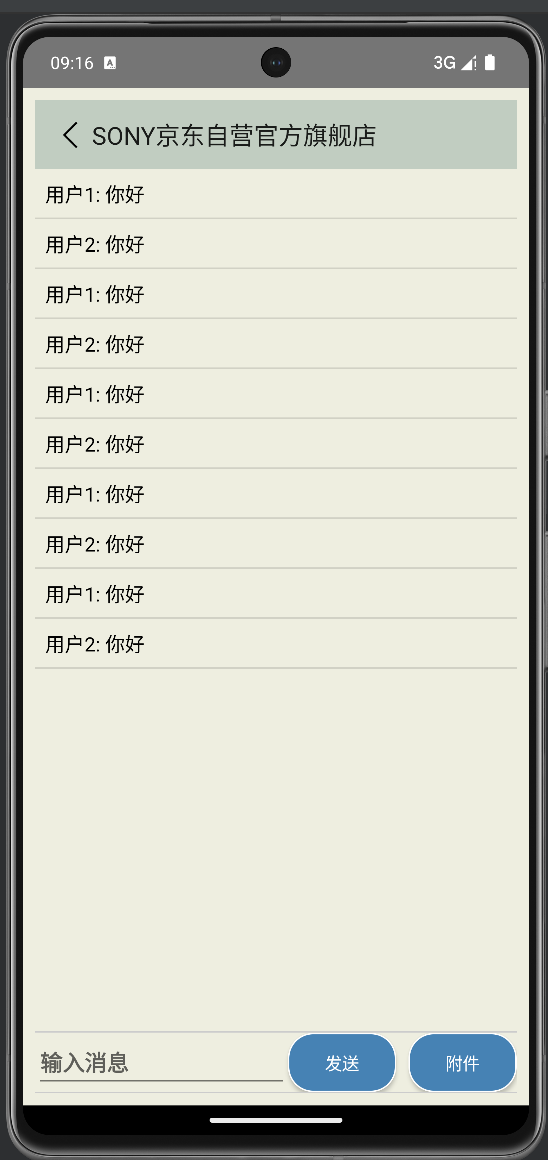
客服聊天界面
购物车界面
项目整体结构
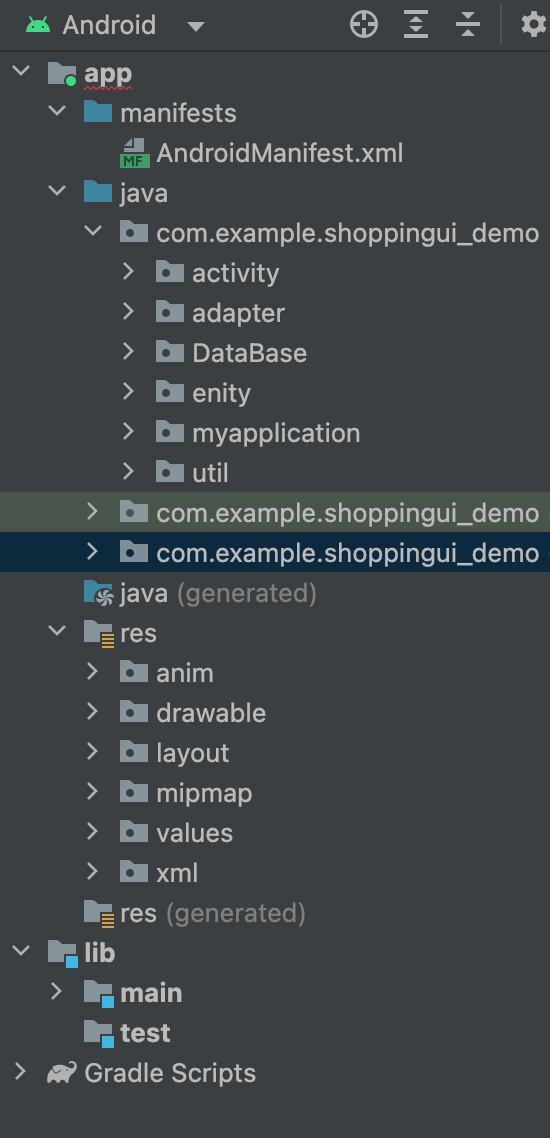
整体结构解释:
1.activity:activity文件夹包含了所有的活动类。这些类是用户界面的一部分,每个活动都对应一个屏幕上的一个界面。
2.adapter:adapter文件夹用于存放数据适配器和视图适配器的实现类。这些类帮助连接数据和视图,使得数据可以在用户界面上显示。
3.DataBase:DataBase文件夹用于存放数据库相关的类和脚本。这里通常会有一个或多个用于存储数据的SQLite数据库文件。
4.myapplication:myapplication文件夹包含应用程序的主要类,通常这个类会扩展自Application类。
5.util:util文件夹用于存放工具类。
6.res:res文件夹包含应用程序的所有资源文件,如布局文件、字符串、图片、样式等。这些文件不包含在源代码中,而是在编译时被直接插入到最终的APK文件中。
7.anim:anim文件夹包含动画相关的XML文件。这些文件定义了各种动画效果,如位图动画、透明度动画等。
8.layout:layout文件夹包含XML文件,这些文件描述了应用程序的用户界面布局。每个XML文件定义了一个或多个屏幕的布局。
9.values:values文件夹包含各种值的定义,如字符串、颜色、尺寸等。这些值可以在其他XML文件中引用和使用。
项目主要代码展示
登录界面的activity
public class login extends AppCompatActivity {

    SQLiteOpenHelperDemo mhelper;

    SharedPreferences preferences;

    EditText userName,passWord;

    CheckBox rememberPasswordCheckBox;

    private String path;

    @Override

    protected void onCreate(Bundle savedInstanceState) {

        super.onCreate(savedInstanceState);

        // 关联activity.xml

        setContentView(R.layout.activity_login);

        // 关联用户名、密码和登录、注册按钮

         userName = (EditText) this.findViewById(R.id.UserNameEdit);

         passWord = (EditText) this.findViewById(R.id.PassWordEdit);

        Button loginButton = (Button) this.findViewById(R.id.LoginButton);

        Button signUpButton = (Button) this.findViewById(R.id.SignUpButton);

        rememberPasswordCheckBox = findViewById(R.id.RememberPasswordCheckBox);

        rememberPasswordCheckBox.setOnClickListener(new View.OnClickListener() {

            @Override

            public void onClick(View v) {

                if (rememberPasswordCheckBox.isChecked()) {

                    try {

                        SharedPreferences.Editor edit = preferences.edit();

                        edit.putString("username", userName.getText().toString());

                        edit.putString("password", passWord.getText().toString());

                        edit.putBoolean("isRemember", rememberPasswordCheckBox.isChecked());

                        edit.commit();

                    } catch (Exception e) {

                        // Handle the exception, log the error, etc.

                        e.printStackTrace();

                    }

                }

            }

        });

        // 登录按钮监听器

        loginButton.setOnClickListener(

                new View.OnClickListener() {

                    @Override

                    public void onClick(View v) {

                        // 获取用户名和密码

                        String strUserName = userName.getText().toString().trim();

                        String strPassWord = passWord.getText().toString().trim();

                        if(mhelper.queryData(strUserName, strPassWord))

                        {

                            Toast.makeText(login.this, "登录成功!", Toast.LENGTH_SHORT).show();

                            Intent intent = new Intent(login.this, MainActivity.class);

                           startActivity(intent);

                           overridePendingTransition(R.anim.slid_in_right,R.anim.slid_out_left);

                        }else {

                            Toast.makeText(login.this, "请输入正确的用户名或密码!", Toast.LENGTH_SHORT).show();

                       }

                    }

                }

        );

        // 注册按钮监听器

        signUpButton.setOnClickListener(

                new View.OnClickListener() {

                    @Override

                    public void onClick(View v) {

                        // 跳转到注册界面

                        Intent intent = new Intent(login.this, sign_up.class);

                        startActivity(intent);

                        overridePendingTransition(R.anim.slid_in_right,R.anim.slid_out_left);

                    }

                }

        );

        preferences=getSharedPreferences ("config",MODE_PRIVATE);

        reload();

    }

    private void reload() {

        boolean isRemember = preferences.getBoolean("isRemember", false);

        if (isRemember) {

            String username = preferences.getString("username", "");

            userName.setText(username);

            String password = preferences.getString("password", "");

            passWord.setText(password);;

            rememberPasswordCheckBox.setChecked(true);

        }

    }

    @Override

    protected void onStart() {

        super.onStart();

        mhelper=SQLiteOpenHelperDemo.getInstance(this);

        mhelper.openWDB();

        mhelper.openRDB();

    }

}
关联activity.xml布局文件,获取用户名、密码输入框和登录、注册按钮的引用;在onCreate方法中,设置布局文件,并初始化SharedPreferences对象用于保存用户的登录信息;为登录按钮添加点击事件监听器,当用户点击登录按钮时,获取用户名和密码,然后调用mhelper的queryData方法查询数据库,如果查询结果为真,则跳转到MainActivity页面,否则提示用户输入正确的用户名或密码;为注册按钮添加点击事件监听器,当用户点击注册按钮时,跳转到sign_up页面;在onStart方法中,初始化SQLiteOpenHelperDemo对象,并打开数据库;reload方法用于从SharedPreferences中读取用户的登录信息,如果需要记住密码,则自动填充用户名和密码。
注册界面的activity
public class sign_up extends AppCompatActivity {

    SQLiteOpenHelperDemo mhelper;

    @Override

    protected void onCreate(Bundle savedInstanceState) {

        super.onCreate(savedInstanceState);

        //关联activity_register.xml

        setContentView(R.layout.activity_sign_up);

        // 关联用户名、密码、确认密码、邮箱和注册、返回登录按钮

        EditText userName = (EditText) this.findViewById(R.id.UserNameEdit);

        EditText passWord = (EditText) this.findViewById(R.id.PassWordEdit);

        EditText passWordAgain = (EditText) this.findViewById(R.id.PassWordAgainEdit);

        EditText email = (EditText) this.findViewById(R.id.EmailEdit);

        Button signUpButton = (Button) this.findViewById(R.id.SignUpButton);

        Button backLoginButton = (Button) this.findViewById(R.id.BackLoginButton);

        // 立即注册按钮监听器

        signUpButton.setOnClickListener(

                new View.OnClickListener() {

                    @Override

                    public void onClick(View v) {

                        String strUserName = userName.getText().toString().trim();

                        String strPassWord = passWord.getText().toString().trim();

                        String strPassWordAgain = passWordAgain.getText().toString().trim();

                        User user=null;

                        String strPhoneNumber = email.getText().toString().trim();

                        String usernameRegex = "^[a-zA-Z0-9]{4,10}$";

                        String passwordRegex = "^[a-zA-Z0-9]{6,16}$";

                        String emailRegex = "^[\\w-]+(\\.[\\w-]+)*@[\\w-]+(\\.[\\w-]+)+$";

                        //注册格式粗检

                        if (!strUserName.matches(usernameRegex)) {

                            Toast.makeText(sign_up.this, "用户名长度必须大于4且小于10!", Toast.LENGTH_SHORT).show();

                        } else if (!strPassWord.matches(passwordRegex)) {

                            Toast.makeText(sign_up.this, "密码长度必须大于6且小于16!", Toast.LENGTH_SHORT).show();

                        } else if (!strPassWord.equals(strPassWordAgain)) {

                            Toast.makeText(sign_up.this, "两次密码输入不一致!", Toast.LENGTH_SHORT).show();

                        } else if (!strPhoneNumber.matches(emailRegex)) {

                            Toast.makeText(sign_up.this, "邮箱格式不正确!", Toast.LENGTH_SHORT).show();

                        } else {

                            user=new User(strUserName,strPassWord);

                            if (mhelper.insertData(user)>0) {

                                Toast.makeText(sign_up.this, "注册成功!", Toast.LENGTH_SHORT).show();

                            } else {

                                Toast.makeText(sign_up.this, "注册失败!用户名重复!", Toast.LENGTH_SHORT).show();

                            }

//

                        }

                    }

                }

        );

        // 返回登录按钮监听器

        backLoginButton.setOnClickListener(

                new View.OnClickListener() {

                    @Override

                    public void onClick(View v) {

                        // 跳转到登录界面

                        Intent intent = new Intent(sign_up.this, login.class);

                        startActivity(intent);

                        overridePendingTransition(R.anim.slide_in_left, R.anim.slide_out_right);

                    }

                }

        );

    }

    @Override

    protected void onStart() {

        super.onStart();

       mhelper=SQLiteOpenHelperDemo.getInstance(this);

        mhelper.openWDB();

        mhelper.openRDB();

    }

}
在onCreate方法中,设置了布局文件activity_sign_up,并关联了用户名、密码、确认密码、邮箱和注册、返回登录按钮的视图组件。然后,通过设置按钮的点击监听器,实现了立即注册功能。当用户点击立即注册按钮时,会进行一系列的验证,包括用户名、密码、确认密码和邮箱的格式检查。如果验证通过,将创建一个User对象,并将其插入到数据库中。如果插入成功,显示注册成功的提示信息;否则,显示注册失败的提示信息。最后,当用户点击返回登录按钮时,会启动登录页面,并使用动画效果进行过渡。在onStart方法中,它获取了SQLiteOpenHelperDemo的实例,并打开了数据库连接。
购物列表的activity
public class MainActivity extends AppCompatActivity {

    private ListView productList; // 产品列表视图

    private ArrayList<Product> productListData=new ArrayList<>(); // 产品列表数据

    private ShoppingDBHelper mdbhelper; // 数据库助手

    /**

     * 在Activity创建时调用

     * 设置布局和初始化变量

     * @param savedInstanceState 保存的实例状态

     */

    @Override

    protected void onCreate(Bundle savedInstanceState) {

        super.onCreate(savedInstanceState);

        setContentView(R.layout.activity_main);

        productList = findViewById(R.id.lvProducts); // 获取产品列表视图

        showGoods(); // 显示产品

        productList.setOnItemClickListener(new AdapterView.OnItemClickListener() {

            @Override

            public void onItemClick(AdapterView<?> parent, View view, int position, long id) {

                Intent intent = new Intent(MainActivity.this, activity_product_detail1.class); // 创建启动产品详情Activity的意图

                Product product = productListData.get(position); // 获取点击的产品

                Bundle bundle=new Bundle();

                bundle.putString("name",product.getName()); // 将产品信息存入Bundle

                bundle.putString("price",product.getPrice());

                bundle.putInt("image",product.getImage());

                bundle.putString("freeShippingInfo",product.getFreeShippingInfo());

                bundle.putString("commentCount",product.getCommentCount());

                bundle.putString("storeName",product.getStoreName());

                intent.putExtras(bundle); // 将Bundle添加到意图

                startActivity(intent); // 启动产品详情Activity

                overridePendingTransition(R.anim.slid_in_right,R.anim.slid_out_left); // 设置过渡效果

            }

        });

    }

    /**

     * 显示产品

     */

    private void showGoods() {

        mdbhelper=ShoppingDBHelper.getInstance(this); // 获取数据库助手实例

        mdbhelper.openWDB(); // 打开写数据库

        mdbhelper.openRDB(); // 打开读数据库

        productListData = mdbhelper.queryAllGoodsinfo(); // 查询所有产品信息

        MyAdapter adapter = new MyAdapter(this, productListData); // 创建适配器

        productList.setAdapter(adapter); // 设置适配器

    }

}
在onCreate方法中,首先调用super.onCreate(savedInstanceState)来执行父类的构造函数,然后设置布局文件activity_main。接着,通过findViewById方法获取产品列表视图(productList),并调用showGoods方法来显示产品。最后,为产品列表视图设置了一个点击监听器,当用户点击某个产品时,会启动一个新的Activity(activity_product_detail1),并将选中的产品信息作为参数传递给新的Activity。同时,还设置了过渡动画效果;showGoods方法用于显示产品。它首先获取数据库助手实例(mdbhelper),然后打开写数据库和读数据库。接着,调用queryAllGoodsinfo方法从数据库中查询所有产品信息,并将结果存储在productListData中。然后,创建一个适配器(MyAdapter),并将其设置为产品列表视图的适配器。这样,产品列表视图就可以显示从数据库中查询到的产品信息了。
商品详情页的activity
public class activity_product_detail1 extends AppCompatActivity {

    private int image;

    private ImageView ivProductImage;

   private ToggleButton btnAddToConect;

   private Button btnBack,btnAddToC,btnAddToShoppingCart,btnAddToCart,btnBuyNow;

   private TextView tvProductName,tvProductPrice,tvProductDiscount,tvProductRating,tvProductStore;

   private ShoppingDBHelper shoppingCart=ShoppingDBHelper.getInstance(this);

    private int cart_count=0;

    private RecyclerView cdRcv;

    private CommentAdapter commentAdapter;

    @SuppressLint("MissingInflatedId")

    @Override

    protected void onCreate(Bundle savedInstanceState) {

        super.onCreate(savedInstanceState);

        setContentView(R.layout.activity_product_detail1);

        ivProductImage = findViewById(R.id.iv_product_image);

        btnBack = findViewById(R.id.btn_back);

        tvProductName = findViewById(R.id.tv_product_name);

        tvProductPrice = findViewById(R.id.tv_product_price);

        tvProductDiscount =findViewById(R.id.tv_product_discount);

        tvProductRating = findViewById(R.id.tv_product_rating);

        btnAddToConect = findViewById(R.id.btn_add_to_conect1);

        btnAddToC = findViewById(R.id.btn_add_to_c);

        btnAddToShoppingCart = findViewById(R.id.btn_add_to_shopping_cart);

        btnAddToCart = findViewById(R.id.btn_add_to_cart);

        btnBuyNow = findViewById(R.id.btn_buy_now);

        tvProductStore= findViewById(R.id.tv_product_store);

        cdRcv = findViewById(R.id.cd_rcv);

        commentAdapter = new CommentAdapter();

        cdRcv.setLayoutManager(new LinearLayoutManager(this));

        cdRcv.setAdapter(commentAdapter);

        // 添加评论数据

        commentAdapter.addComment("这是一条好评");

        commentAdapter.addComment("这是一条中评");

        btnAddToShoppingCart.setOnClickListener(new View.OnClickListener() {

            @Override

            public void onClick(View view) {

                Intent intent=new Intent(activity_product_detail1.this, Shopping_Cart.class);

                startActivity(intent);

                overridePendingTransition(R.anim.slid_in_right,R.anim.slid_out_left);

            }

        });

        btnAddToConect.setOnCheckedChangeListener(new CompoundButton.OnCheckedChangeListener() {

            @Override

            public void onCheckedChanged(CompoundButton buttonView, boolean isChecked) {

                if (isChecked) {

                    btnAddToConect.setBackgroundResource(R.drawable.yishoucang);

                    Toast.makeText(getApplicationContext(), "已收藏", Toast.LENGTH_SHORT).show();

                } else {

                    btnAddToConect.setBackgroundResource(R.drawable.shoucang);

                    Toast.makeText(getApplicationContext(), "已取消收藏", Toast.LENGTH_SHORT).show();

                }

            }

        });

        btnAddToC.setOnClickListener(new View.OnClickListener() {

            @Override

            public void onClick(View view) {

                Intent intent2=new Intent(activity_product_detail1.this, chatactivity.class);

                Bundle bundle2=new Bundle();

                bundle2.putString("storename",tvProductStore.getText().toString());

                intent2.putExtras(bundle2);

                startActivity(intent2);

                overridePendingTransition(R.anim.slid_in_right,R.anim.slid_out_left);

            }

        });

        btnAddToCart.setOnClickListener(new View.OnClickListener() {

            @Override

            public void onClick(View view) {

                String name = tvProductName.getText().toString();

                String price=tvProductPrice.getText().toString();

                goodCartInfo cartInfo=new goodCartInfo();

                cartInfo.setCount(1);

                cartInfo.setGood_image(image);

                cartInfo.setGood_name(name);

                cartInfo.setGood_price(price);

                if (cart_count==0) {

                    Toast.makeText(getApplicationContext(), "宝贝在购物车等主人哦~", Toast.LENGTH_SHORT).show();

                    shoppingCart.addCartInfo(cartInfo);

                    cart_count++;

                } else {

                    cart_count++;

                    Toast.makeText(getApplicationContext(), "已添加"+cart_count+"件宝贝到购物车", Toast.LENGTH_SHORT).show();

                    shoppingCart.updateCartInfoCount(name,cart_count);

                }

               //把商品的数量和名字的信息添加到数据库的cart_info表

            }

        });

        btnBuyNow.setOnClickListener(new View.OnClickListener() {

            @Override

            public void onClick(View view) {

                Intent intent1;

                intent1 = new Intent(activity_product_detail1.this, dock_demo.class);

                Bundle bundle=new Bundle();

                bundle.putString("price",tvProductPrice.getText().toString());

                bundle.putInt("image",image);

                //bundle.putString("freeShippingInfo",product.getFreeShippingInfo());

                //bundle.putString("commentCount",product.getCommentCount());

                //bundle.putString("storeName",product.getStoreName());

                intent1.putExtras(bundle);

                startActivity(intent1);

       overridePendingTransition(R.anim.bottom_in, R.anim.bottom_static);

            }

        });

        Bundle bundle = getIntent().getExtras();

        String name = bundle.getString("name");

        String price=bundle.getString("price");

       image=bundle.getInt("image");

        String freeShippingInfo=bundle.getString("freeShippingInfo");

        String commentCount=bundle.getString("commentCount");

        String storeName=bundle.getString("storeName");

        tvProductPrice.setText(price);

        ivProductImage.setImageResource(image);

        tvProductName.setText(name);

        tvProductDiscount.setText(freeShippingInfo);

        tvProductRating.setText(commentCount);

        tvProductStore.setText(storeName);

        btnBack.setOnClickListener(new View.OnClickListener() {

            @Override

            public void onClick(View view) {

                finish();

                overridePendingTransition(R.anim.slide_in_left, R.anim.slide_out_right);

            }

        });

    }

}
在onCreate方法中,通过布局文件R.layout.activity_product_detail1设置界面元素,并初始化这些变量;为各个界面元素设置点击事件监听器,以实现相应的功能;在btnAddToConect的点击事件中,切换按钮的背景资源,并显示相应的提示信息;在btnAddToC的点击事件中,启动一个新的Activity(聊天界面),并将产品商店名称作为额外数据传递;在btnAddToCart的点击事件中,将产品的名称、价格等信息添加到购物车,并更新购物车的数量;在btnBuyNow的点击事件中,启动一个新Activity,并将产品的价格和图片作为额外数据传递;从Intent中获取产品的名称、价格、图片等信息,并设置到相应的界面元素上;为返回按钮设置点击事件监听器,以关闭当前Activity并过渡动画效果。
购物车界面的activity
public class Shopping_Cart extends AppCompatActivity {

    private ArrayList<goodCartInfo> productListData1; // 商品信息列表

    private ListView productList1; // 商品列表视图

    private MyAdapter2 adapter3; // 自定义适配器

    private Button deleteBtn, backBtn; // 删除按钮、返回按钮

    private ShoppingDBHelper shoppingCart; // 数据库助手

    /**

     * OnCreate方法,在Activity创建时调用

     * @param savedInstanceState 保存状态

     */

    @SuppressLint({"WrongViewCast", "MissingInflatedId"})

    @Override

    protected void onCreate(Bundle savedInstanceState) {

        super.onCreate(savedInstanceState);

        setContentView(R.layout.activity_shopping_cart);

        productList1 = findViewById(R.id.el_cart); // 获取商品列表视图

        backBtn = findViewById(R.id.btn_back); // 获取返回按钮

        productListData1 = new ArrayList<>(); // 初始化商品信息列表

        shoppingCart = ShoppingDBHelper.getInstance(this);

        productListData1 = shoppingCart.queryAllCartGoodsinfo();// 从数据库查询所有购物车商品信息

        adapter3 = new MyAdapter2(Shopping_Cart.this, productListData1); // 创建自定义适配器

        productList1.setAdapter(adapter3); // 设置适配器

        backBtn.setOnClickListener(new View.OnClickListener() {

            @Override

            public void onClick(View v) {

                finish(); // 结束Activity

                overridePendingTransition(R.anim.slide_in_left, R.anim.slide_out_right); // 使用动画过渡

            }

        });

    }

}
onCreate方法是Activity生命周期中的第一个方法,当Activity被创建时会被调用。在这个方法中,首先调用了父类的onCreate方法,并设置了布局文件为activity_shopping_cart;通过findViewById方法获取了商品列表视图productList1和返回按钮backBtn的引用;初始化了商品信息列表productListData1为空的ArrayList;通过ShoppingDBHelper类的单例模式获取了数据库助手shoppingCart的实例;从数据库查询所有购物车商品信息,并将结果赋值给productListData1;创建了一个自定义适配器adapter3,并将商品信息列表传递给它;将适配器设置到商品列表视图productList1上,以便在界面上显示商品列表;为返回按钮backBtn设置了一个点击事件监听器。当用户点击返回按钮时,会结束当前Activity,并使用动画过渡效果。
myapplication类
public class MyApplication extends android.app.Application{

    @Override

    public void onCreate() {

        super.onCreate();

        initgoodsinfo();

    }

    private void initgoodsinfo() {

        boolean isfirst = sharedUtil.getInstance(this).readBoolean("first", true);

        if (isfirst) {

            ArrayList<Product> goods = new ArrayList<>();

            goods= goodsinfo.getgoodsinfo();

            ShoppingDBHelper dbhelper=ShoppingDBHelper.getInstance(this);

            dbhelper.openWDB();

            dbhelper.insertgoodsinfo(goods);

            dbhelper.closeDB();

            sharedUtil.getInstance (this).writeBoolean("first", false);

        }

    }

}
在onCreate()方法中,首先调用了父类的onCreate()方法,然后调用了initgoodsinfo()方法进行初始化操作。initgoodsinfo()方法的作用是初始化商品信息。首先,通过sharedUtil.getInstance(this).readBoolean(“first”, true)读取一个布尔值,判断是否是第一次运行程序。如果是第一次运行,那么执行以下操作:创建一个Product对象的ArrayList,用于存储商品信息;调用goodsinfo.getgoodsinfo()方法获取商品信息,并将其赋值给goods列表;创建一个ShoppingDBHelper对象,用于操作数据库;调用dbhelper.openWDB()方法打开数据库;调用dbhelper.insertgoodsinfo(goods)方法将商品信息插入到数据库中。;调用dbhelper.closeDB()方法关闭数据库;最后,通过sharedUtil.getInstance (this).writeBoolean(“first”, false)将first键的值设置为false,表示已经执行过初始化操作。
如果程序不是第一次运行,那么不会执行上述操作。
goodsinfo类
public class goodsinfo {

    static ArrayList<Product> getgoodsinfo (){

        ArrayList<Product> productListData1;

        productListData1 = new ArrayList<>();

        productListData1.add

                (new Product(R.drawable.product_img1,"索尼(SONY)WF-1000XM5 真无线蓝牙降噪耳机",

                        "¥1999", "包邮","1万+评价  95%好评",

                        "SONY京东自营官方旗舰店"));

        productListData1.add

                (new Product(R.drawable.protduct_img2,"索尼(SONY)WH-1000XM5 头戴式无线降噪耳机",

                        "¥2499", "包邮","5万+评价  96%好评",

                        "SONY京东自营官方旗舰店"));

        productListData1.add

                (new Product(R.drawable.protduct_img3,"索尼(SONY)WI-C100 无线立体声 颈挂式 蓝牙耳机",

                        "¥179", "包邮","10万+评价  93%好评",

                        "SONY京东自营官方旗舰店"));

        productListData1.add

                (new Product(R.drawable.protduct_img4,"索尼(SONY) WF-C500真无线蓝牙耳机 IPX4防水防汗",

                        "¥399", "包邮","5万+评价  94%好评",

                        "SONY京东自营官方旗舰店"));

        productListData1.add

                (new Product(R.drawable.protduct_img5,"索尼(SONY)ZV-E10L Vlog微单数码相机",

                        "¥5799", "包邮","2万+评价  98%好评",

                        "SONY京东自营官方旗舰店"));

        productListData1.add

                (new Product(R.drawable.protduct_img6,"索尼(SONY)SRS-NS7R 颈挂式蓝牙音箱 可穿戴式",

                        "¥1699", "包邮","2000+评价  96%好评",

                        "SONY京东自营官方旗舰店"));

        return productListData1;

    }

}
在这个方法中,首先创建了一个名为productListData1的ArrayList<Product>对象。然后,通过调用new ArrayList<>()构造函数来初始化这个列表;接下来,使用add方法向productListData1列表中添加了6个Product对象。每个Product对象都包含了一些属性,如图片资源ID、产品名称、价格、是否包邮、评价信息和商家名称等。这些属性的值是通过构造函数传递给Product对象的;最后,方法返回填充好的productListData1列表。
商品和购物车的 SQLiteOpenHelper
public class ShoppingDBHelper extends SQLiteOpenHelper {

    private static final String DB_NAME = "shopping.db";

    private static final String TABLE_NAME_Good_info = "good_info";

    private static final String TABLE_NAME_cart_info = "cat_info";

    private static final int version = 2;

    private static ShoppingDBHelper mhelper = null;

    private SQLiteDatabase mRDB = null;

    private SQLiteDatabase mWDB = null;

    public SQLiteDatabase openRDB() {

        if (mRDB == null || !mRDB.isOpen()) {

            mRDB = mhelper.getReadableDatabase();

        }

        return mRDB;

    }

    public SQLiteDatabase openWDB() {

        if (mWDB == null || !mWDB.isOpen()) {

            mWDB = mhelper.getWritableDatabase();

        }

        return mWDB;

    }

    public void closeDB() {

        if (mRDB != null && mRDB.isOpen()) {

            mRDB.close();

            mRDB = null;

        }

        if (mWDB != null && mWDB.isOpen()) {

            mWDB.close();

            mWDB = null;

        }

    }

    public static ShoppingDBHelper getInstance(Context context) {

        if (mhelper == null) {

            mhelper = new ShoppingDBHelper(context);

        }

        return mhelper;

    }

    private ShoppingDBHelper(Context context) {

        super(context, DB_NAME, null, version);

    }

@Override

    public void onCreate(SQLiteDatabase db) {

        //创建数据库sql语句并执行

        String sql = "create table if not exists good_info" +

                "(id integer primary key autoincrement," +

                "name varchar(100),price varchar(20)" +

                ",freeShippingInfo varchar(20),commentCount varchar(20)" +

                ",storeName varchar(20),image integer)";

        db.execSQL(sql);

    String sql1 = "create table if not exists cart_info" +

            "(id integer primary key autoincrement," +

            "good_name varchar(100) not null,count integer " +

            "not null,price varchar(20),image integer)";

    db.execSQL(sql1);;

    }

    @Override

    public void onUpgrade(SQLiteDatabase db, int oldVersion, int newVersion) {

    }

    public long insertgoodsinfo(ArrayList<Product> list) {

        long result = 0;

        try {

            mWDB.beginTransaction();

            for (Product product : list) {

                ContentValues values = new ContentValues();

                values.put("name", product.getName());

                values.put("price", product.getPrice());

                values.put("freeShippingInfo", product.getFreeShippingInfo());

                values.put("commentCount", product.getCommentCount());

                values.put("storeName", product.getStoreName());

                values.put("image", product.getImage());

                result = mWDB.insert("good_info", null, values);

            }

            mWDB.setTransactionSuccessful();

        } catch (Exception e) {

            e.printStackTrace();

        } finally {

            mWDB.endTransaction();

        }

        return result;

    }

    //把商品的数量和名字的信息添加到数据库的cart_info表

public void addCartInfo(goodCartInfo cartInfo) {

    SQLiteDatabase db = null;

    try {

        db = getWritableDatabase();

        ContentValues values = new ContentValues();

        values.put("count",cartInfo.getCount());

        values.put("good_name",cartInfo.getGood_name());

        values.put("price",cartInfo.getGood_price());

        values.put("image",cartInfo.getGood_image());

        db.insert("cart_info", null, values);

    } catch (SQLException e) {

        e.printStackTrace();

    }

    }

    public void updateCartInfoCount(String good_name, int count) {

    SQLiteDatabase db = null;

    try {

        db = getWritableDatabase();

        ContentValues values = new ContentValues();

        values.put("count", count);

        db.update("cart_info", values, "good_name" + " = ?", new String[]{good_name});

    } catch (SQLException e) {

        e.printStackTrace();

    }

}

    public ArrayList<Product> queryAllGoodsinfo() {

        ArrayList<Product> list = new ArrayList<>();

        String sql = "select * from good_info";

        Cursor cursor = mRDB.rawQuery(sql, null);

        while (cursor.moveToNext()) {

            Product product = new Product(cursor.getInt(6), cursor.getString(1),

                    cursor.getString(2),cursor.getString(3),

                    cursor.getString(4),cursor.getString(5));

            list.add(product);

        }

        cursor.close();

        return list;

    }

    public ArrayList<goodCartInfo> queryAllCartGoodsinfo() {

        ArrayList<goodCartInfo> list = new ArrayList<>();

        SQLiteDatabase db=getReadableDatabase();

        String sql = "select*from cart_info";

        Cursor cursor = mRDB.rawQuery(sql, null);

        while (cursor.moveToNext()) {

          goodCartInfo cartInfo1 = new goodCartInfo();

          cartInfo1.setGood_name(cursor.getString(1));

          cartInfo1.setCount(cursor.getInt(2));

          cartInfo1.setGood_price(cursor.getString(3));

          cartInfo1.setGood_image(cursor.getInt(4));

            list.add(cartInfo1);

        }

        return list;

    }

    public void deleteCartInfoByGoodName(String good_name) {

        SQLiteDatabase db = null;

        try {

            db = getWritableDatabase();

            db.delete("cart_info", "good_name" + " = ?", new String[]{good_name});

        } catch (SQLException e) {

            e.printStackTrace();

        }

    }

}
类中定义了一些静态变量,如DB_NAME(数据库名称)、TABLE_NAME_Good_info(商品信息表名)和TABLE_NAME_cart_info(购物车信息表名),以及一个静态的ShoppingDBHelper实例mhelper;openRDB()和openWDB()方法用于打开可读和可写的数据库连接。如果连接不存在或已关闭,它们会创建一个新的连接;closeDB()方法用于关闭数据库连接;getInstance(Context context)方法用于获取ShoppingDBHelper的单例实例。如果实例不存在,它会创建一个新的实例;onCreate(SQLiteDatabase db)方法在数据库第一次创建时调用,用于创建两个表:good_info和cart_info;onUpgrade(SQLiteDatabase db, int oldVersion, int newVersion)方法在数据库版本升级时调用,但在这个例子中没有实现任何操作;insertgoodsinfo(ArrayList<Product> list)方法用于向good_info表中插入商品信息。它接收一个Product对象的列表,并使用事务将每个对象插入到数据库中;addCartInfo(goodCartInfo cartInfo)方法用于向cart_info表中添加购物车信息。它接收一个goodCartInfo对象,并将其插入到数据库中;updateCartInfoCount(String good_name, int count)方法用于更新购物车中某个商品的数量。它接收一个商品名称和一个数量,然后更新数据库中对应的记录;queryAllGoodsinfo()方法用于查询所有商品信息。它从good_info表中查询所有记录,并将结果存储在一个Product对象的列表中返回;queryAllCartGoodsinfo()方法用于查询所有购物车商品信息。它从cart_info表中查询所有记录,并将结果存储在一个goodCartInfo对象的列表中返回;deleteCartInfoByGoodName(String good_name)方法用于根据商品名称删除购物车中的某个商品。它接收一个商品名称,然后从cart_info表中删除对应的记录。